UVM Template Generator
Every verification engineer knows the ritual. You start a new block, and the first few hours disappear into boilerplate: copy-pasting a driver from your last project, renaming every instance of the old DUT name, fixing the signals that don’t match, untangling the leftover scoreboard logic that doesn’t apply. By the time you have a compiling skeleton, you’ve already lost half a day to find-and-replace.
I built the UVM Template Generator to eliminate that overhead entirely.
What It Does
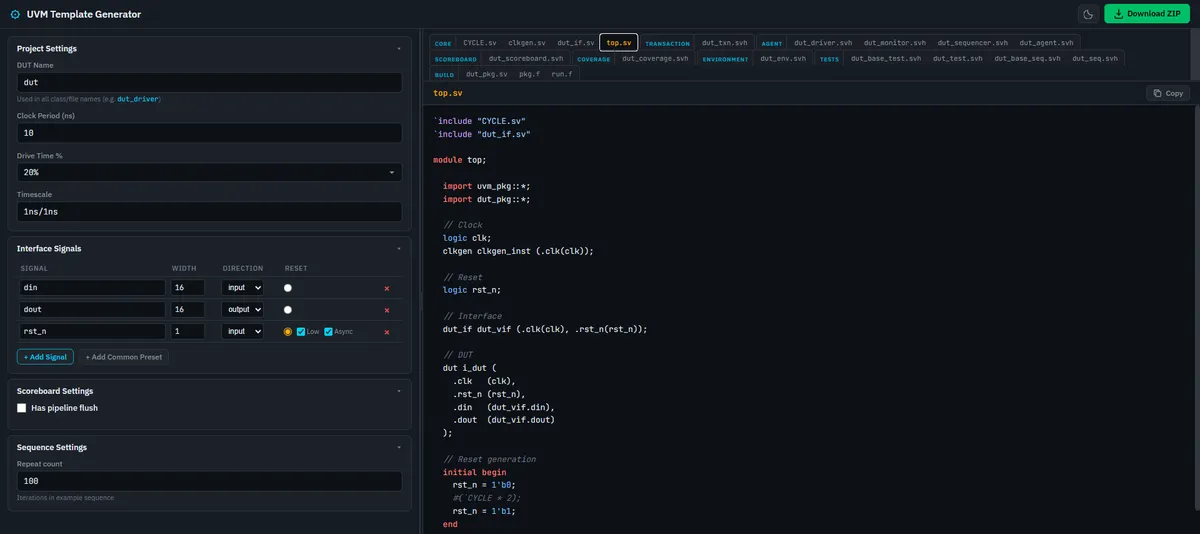
You fill in a form with the DUT name, clock period, interface signals, and the tool instantly generates a complete, best-practice UVM testbench across 19 SystemVerilog files. Every file follows a consistent <dut>_<component> naming convention, uses uvm_config_db for configuration, and implements manual do_copy/do_compare/convert2string methods (no field macros).
The generated testbench includes:
| Component | Files |
|---|---|
| Core | Clock/timescale defines, clock generator, interface with clocking block, top-level module |
| Transaction | Transaction class with do_copy, do_compare, convert2string |
| Agent | Driver, monitor, sequencer, and agent wrapper |
| Scoreboard | Unified scoreboard with predict(), compare, and report_phase |
| Coverage | Coverage subscriber with covergroup |
| Environment | Environment bundling agent + scoreboard + coverage |
| Tests | Base test and concrete test classes |
| Sequences | Base sequence with objection handling + example sequence |
| Build | Package file, compile file list (pkg.f), and run file list (run.f) |
All 19 files regenerate live as you edit the settings, and there’s no “Generate” button to click.
Why Not Just Use a Script?
There are Perl and Python scripts floating around that do something similar. I’ve used a few of them. Here’s what bothered me:
- Setup friction. You need to clone a repo, install dependencies, figure out the CLI flags. On a locked-down corporate machine, this can be a non-trivial exercise.
- No preview. You run the script, get a pile of files, and then open each one to see if it generated what you expected. If something is wrong, you edit the config and re-run.
- Cost. The big EDA vendors already offer UVM testbench generation, but they come with big price tags. The best of them all is perhaps the Siemens EDA UVM Framework (UVMF). This includes a code generator for rapidly scaffolding UVMF-based testbenches. It’s technically open-source, but the full workflow assumes access to Questa and the Verification Academy toolchain.
The UVM Template Generator runs entirely in the browser. Open the link, configure your DUT, and download the ZIP. No install, no server, no data leaving your machine.
Key Features
Signal Table
The interface signals are configured through an interactive table. For each signal, you specify:
- Name - the signal identifier
- Width - bit width (supports multi-bit buses)
- Direction - input or output relative to the DUT
- Reset - designate a signal as the reset, with options for active-low and async reset
The signals you define propagate through every generated file: the interface, the driver’s drive_item() task, the monitor’s sample_dut() task, the transaction class fields, and the coverage covergroup.
Scoreboard Pipeline Flush
If your DUT has pipeline latency, the scoreboard needs to ignore the first N transactions before it starts comparing. There’s a checkbox for this - enable it, set the flush count, and the generated scoreboard handles it automatically.
Download ZIP
One click bundles all 19 files into a <dut>_uvmtb.zip archive, ready to drop into your project directory.
Syntax Highlighting
The code preview panel includes regex-based SystemVerilog syntax coloring - keywords, types, UVM macros, strings, comments, and numbers are all highlighted to make the preview readable.
Dark / Light Theme
Toggle between dark and light modes via the header button. Your preference is saved in localStorage.
The Methodology Behind It
The template structure is inspired by the Paradigm Works / Cliff Cummings UVM TB template, with a few deliberate differences:
- Unified scoreboard instead of separate input/output scoreboards
uvm_config_dbfor passing the virtual interface (no global handles)- Manual
do_copy/do_compare/convert2stringinstead of UVM field macros, which are known to have performance and debugging issues
These choices reflect what I’ve found to be the most maintainable and debuggable patterns in real tapeout projects.
What’s Next
- Multi-agent environments - support for multiple agents within a single environment (e.g., separate AXI and APB agents).
- Register layer generation - generate a UVM register model (
uvm_reg_block,uvm_reg,uvm_reg_adapter) from a register map definition. - Custom template presets - save and load your own configuration presets (signal sets, naming conventions, scoreboard options) for quick reuse across projects.
If any of these would be useful to you, or if you have other ideas, feel free to open an issue on GitHub.
How to Use It
Online: Head to glenzac.github.io/uvm-template-gen. Everything runs client-side.
Offline: Clone the repo and open index.html directly - no build step, no server:
git clone https://github.com/glenzac/uvm-template-gen.git
xdg-open uvm-template-gen/index.html
The source is on GitHub under the GPL-3.0 license. Contributions and feedback are welcome!
Comments