One wrong screw!
Couple of days ago, my brother’s laptop started giving trouble and naturally, it landed on my table. 😁 He said there was something wrong with the power jack, it was loose and was constantly getting disconnected. Before dismantling anything, I thought to just verify the power supply brick. It read a good 20V. So I assumed it to be fine.
I downloaded the service guide of the Thinkpad T420 and started taking things apart. The superior construction of Thinkpad laptops was clearly visible (compared to other Lenovo laptops). The one silly problem with it was the many types of screws. It not only had the standard M2 screws but there were silver ones, and M2 screws of 10mm, 3mm and also 5mm and various other sizes. 😶 When removing the bottom cover I unscrewed them all at once. Then I went for the keyboard, followed by the top cover. I also had to remove a few more components before I could reach the power jack. Thankfully, it had a connector for a power jack. Unlike many laptops that have the power pin directly soldered onto the main board 🤦♂️ and its such a pain to remove all the solder from the tiny data pins.
The power jack wires were all intact and the whole think looked fine. Just to make it tight, I used a pair of forceps to push the metal pins closer. I couldn’t find anything else wrong with it. So I tested it again after assembling the required parts and still the battery wasn’t charging. I decided to check the power brick again and lo it only showed 2.5V now. So all this while, that was the real culprit 🤦♂️
We decided to order a new charger and I started assembling everything back quickly (I had an exam the next day 😶)
In a hurry, I didn’t bother to look at the documentation and assembled everything back. I started doing things from memory. I had some idea of which screws went where, but apparently it was not very accurate and after I had done assembling it - I still had 2 screws left. 😅 So I had clearly missed some screws, somewhere inside. With no power supply and a dead battery I had no way to check if I had done more harm than good. 😅 We decided to wait for the new charger to arrive.
Five or six days later, the new charger was here. I measured the voltage thrice 😂 it was a stable ~20V. Plugged the laptop in and the battery started charging we decided to give it ten minutes to go past the dead state. When it was time, I pressed the power button and the screen wouldn’t turn on. It just beeped many times and turned off. 😶 I tried it again and it was still the same, this time though I could sense a pattern - --- --- - it was beeping in a 1-3-3-1 beep fashion. My instant thought was it was crying: SOS SOS…save me from this guy who knows nothing 😅
Google told me the pattern meant a memory problem. The Thinkpad has two memory slots, one on the back and one right under the keyboard (The extra RAM it had was the 4Gb I had salvaged from an old MSI laptop). I carefully removed the bottom one (as it was the easiest to remove) and reinserted it. That didn’t work. I got the same SOS SOS beep. 😒
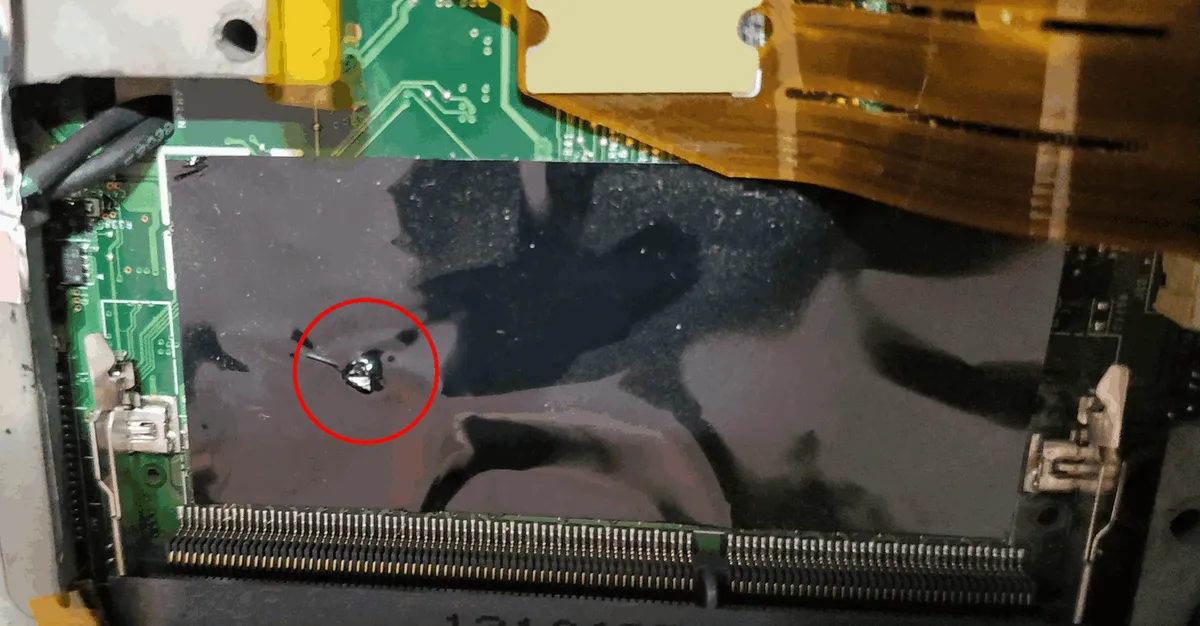
I had no choice but to open everything up again to access the RAM underneath the keyboard. I was really skeptical about the beeps since I hadn’t touched that RAM module earlier, so there was no way it would be causing any problems. I did all the disassembling and I was shocked to find this blunder of mine:
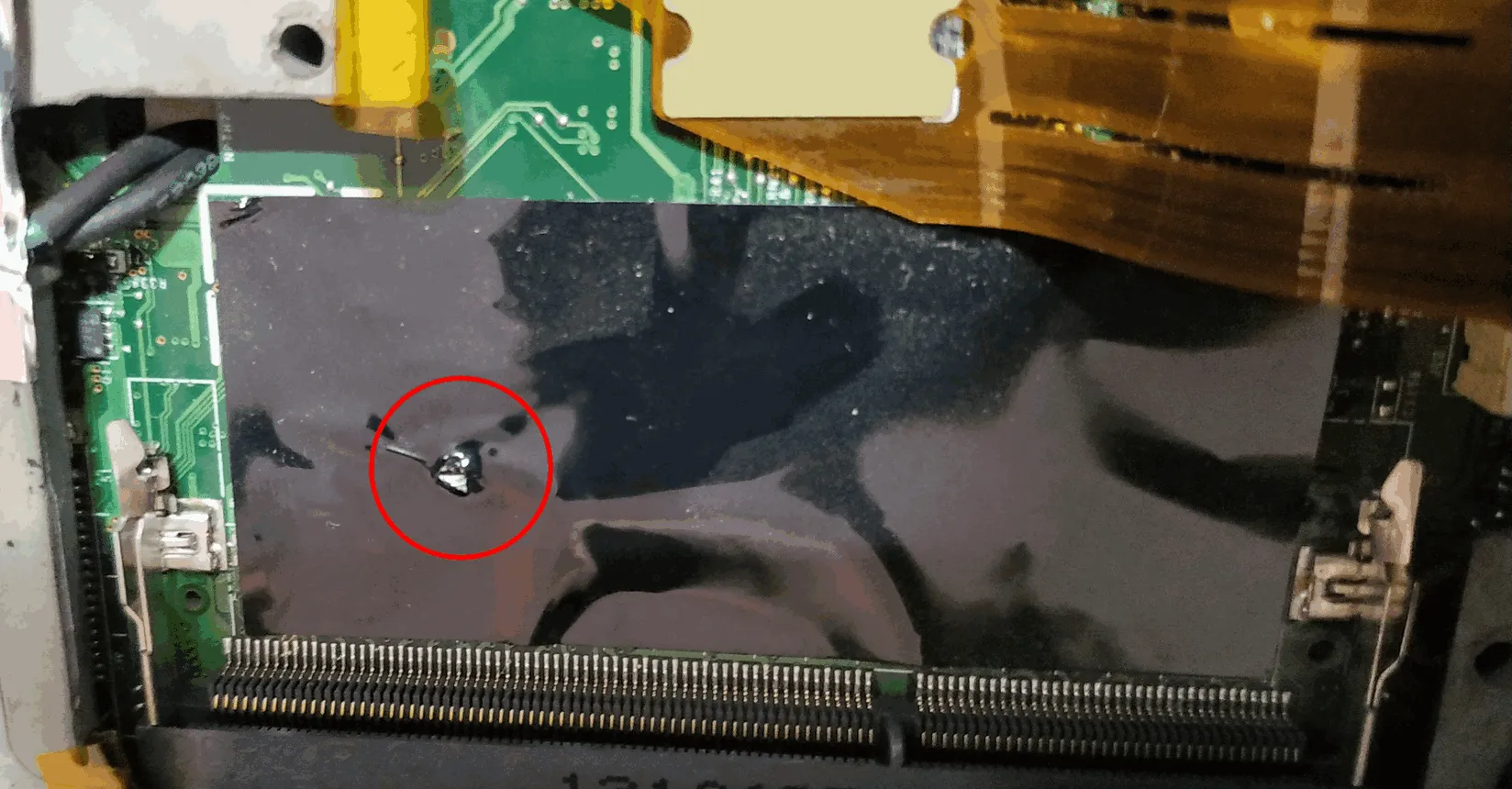
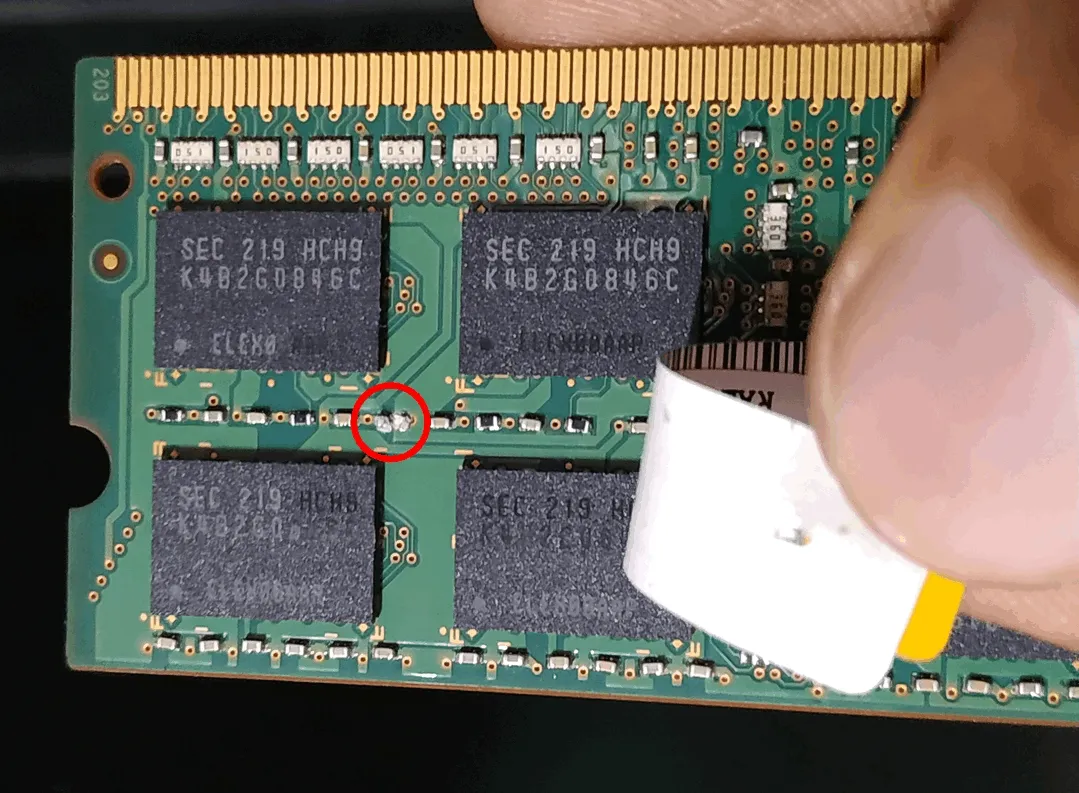
By using the wrong screw which unfortunately happened to be long, it went way beyond the threaded inserts to go and literally drill a tiny capacitor and turn it to powder. 😪 I quickly removed that screw, fully aware of the fact that one single screw had killed a system. Instantly, a lot of things started going through my mind; if the capacitor was connected between the supply rails and if the screw had touched both the pads it would have been a short circuit. On close examination it did look like a decoupling capacitor (which means a short was likely😶). I scraped off the capacitor remains carefully and came to the conclusion that:
i) if the screw had shorted the pads (worst case scenario) - The RAM would have been completely fried and along with it many sections of the board would have been damaged beyond repair ⇒ replacement of the whole board ⇒ it would cost a lot since this was a Thinkpad
ii) The screw didn’t reach the pads but it only destroyed the capacitor (best case scenario) - It would mean I would have to either throw away that RAM or solder the right SMD cap (mind you, I’ve very shaky hands 😑 and have never tried SMD soldering before).
To disprove my worst fears, I removed the damaged RAM module and powered up the PC, thankfully it turned on😌. So I was left with my best case. A single wrong screw had destroyed a RAM module. Out of curiosity, I thought to try out the damaged RAM module just once more after thorough cleaning. On powering the PC up, it no longer beeped and when I checked the Device properties both RAM slots were occupied and working. Damn, so I turned out to be very lucky. Maybe the loss of a capacitor made it more prone to noise, and which would mean I made it less reliable? Only time will tell anyways, so far so good.
Comments